Dashboard Page
The Dashboard page provides a customizable summary of data and access to other gemRetailer pages. It page displays after you log in to gemRetailer. From the Dashboard page, you can navigate to other pages in the portal, based on your role type. The page includes configurable widgets that let you customize the information you see. Widget data displays in either a graphical or tabular format.
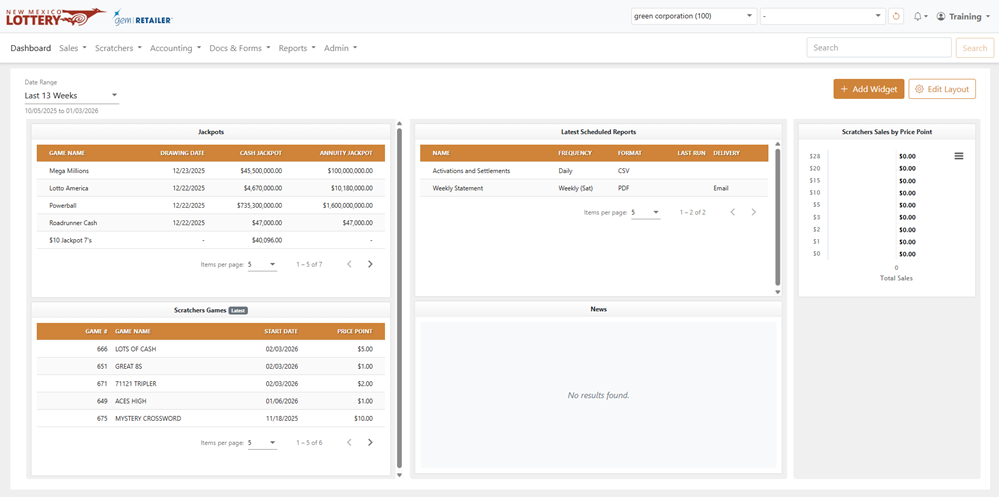
The Header and Menu bar display at the top of the Dashboard page and all other portal pages. For more information, see Navigating gemRetailer. The Lottery logo in the upper-left corner links to the New Mexico Lottery website. The information displayed on the Dashboard depends on the user type. You can view chain information by selecting a chain and/or retailer from the Menu bar.
Widgets
Use widgets to select and configure your dashboard. Widgets display data in either a graphical or tabular format, depending on the type of widget. Click the [Add Widget] button to add a widget, or click the [Edit Layout] button to edit the dashboard layout. See Add a Widget or Edit Dashboard Layout for more information.
News
The News section contains a grid that displays news items posted by the New Mexico Lottery. Only Lottery Retailer Ops Super Users can create or edit the news displayed in this section. Each row shows the date the news item was posted and its headline. Click a row to open the news item and view its full content, along with any attachments or images.