Sales Menu

The Sales menu gives access to the following pages:
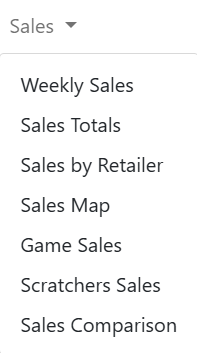
The Sales menu gives access to the following pages:

Table data on Sales screens can be exported as CSV, XLSX, PDF, or XML format. Most columns are sortable unless specified otherwise.

Accessing the Sales Menu

Corporate Users

The Sales menu is always available.

  • If you do not select a location on the Menu bar, Sales pages display rolled-up information for all locations, as authorized by your user role type. To display totals for a single retailer location, select the location on the Menu bar.
  • If you select an retailer location on the Menu bar, Sales pages display information for the selected location. 

Retailer Users

The Sales menu is always available. Sales pages display information for the retailer location as allowed by your user role type.

Lottery Users

The Sales menu is always available.

  • If you select a chain but do not select an retailer location, Sales pages display information for all the retailers in the chain.
  • If you select a chain and a retailer on the Menu bar, Sales pages display information for the selected location. 

See also:

Scratchers

Accounting

Docs & Forms

Reports

Admin